
BLN Notify
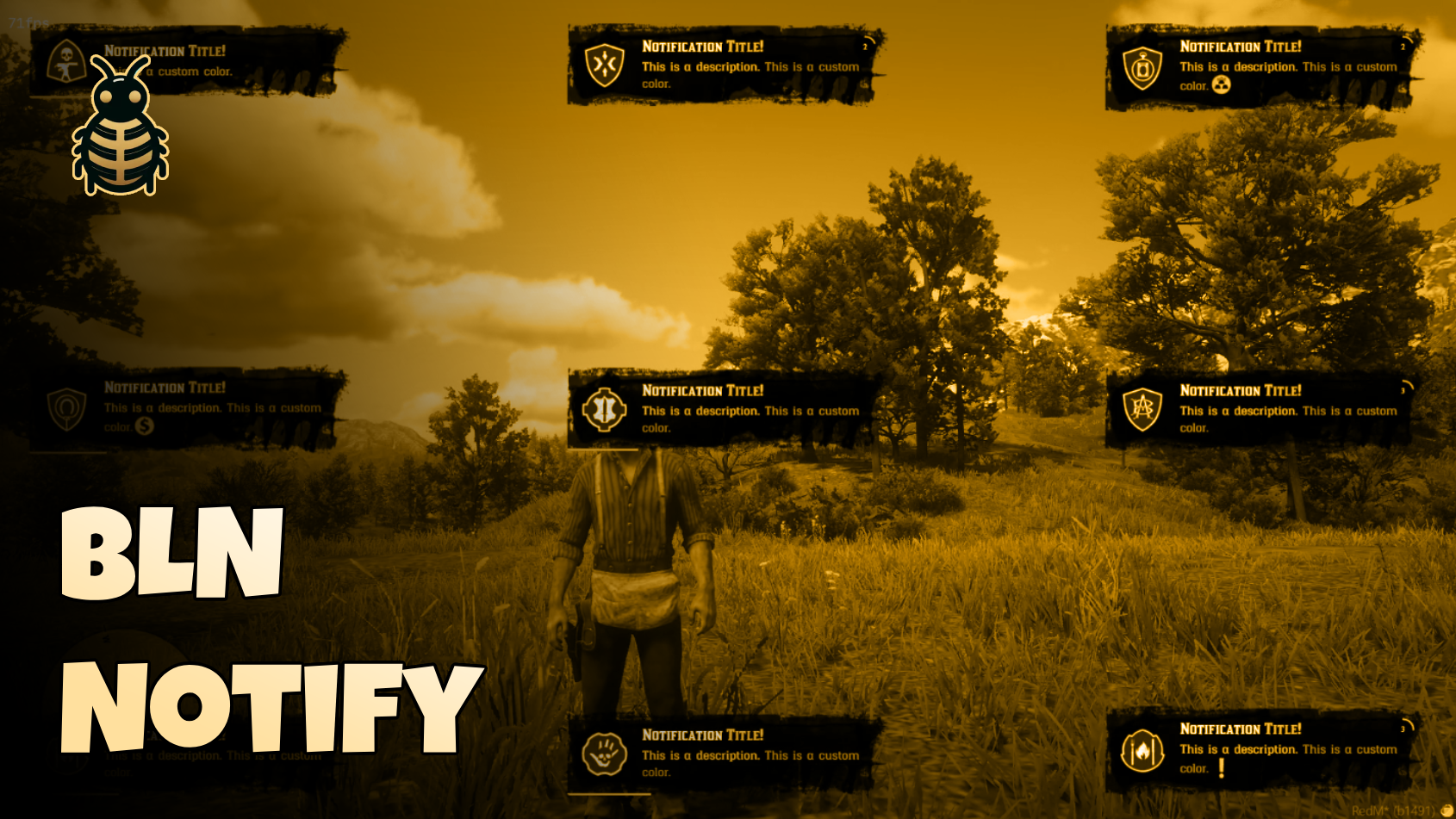




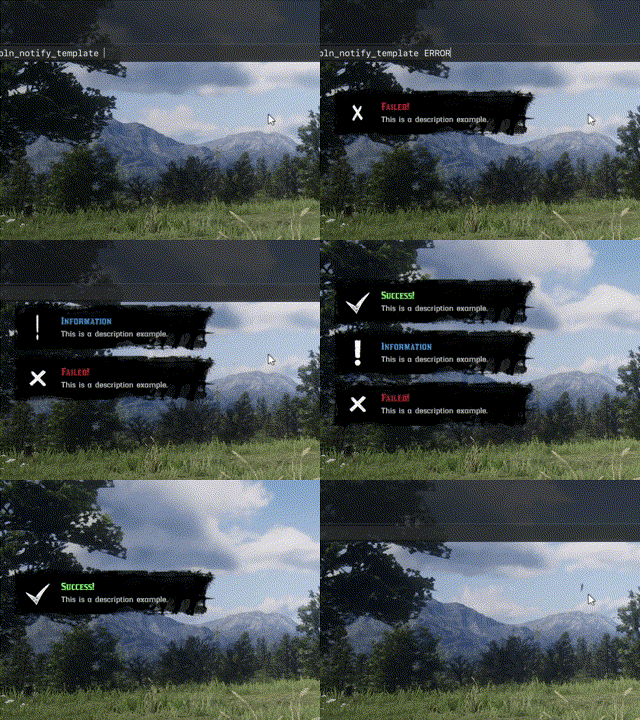

A standalone, flexible, and customizable notification system for RedM servers. BLN Notify provides a complete notification solution with support for animations, interactive key bindings, progress indicators, RTL languages, and extensive customization options.
📺 Preview
🔽 Get it Now
✨ Features
- 🌐 RTL Support: Full right-to-left text direction support for Arabic, Hebrew, and other RTL languages
- 📚 Predefined Templates: 7 built-in templates (INFO, SUCCESS, ERROR, REWARD_MONEY, TIP, TIP_CASH, TIP_XP, TIP_GOLD) for quick usage
- 🧭 9 Placement Options: Support for all screen positions (top/middle/bottom × left/center/right)
- 📱 Responsive Design: Adapts to various screen sizes with automatic sizing
- 🎵 Custom Sounds: Configurable notification sounds using RedM's native sound system
- 🎛️ Dual Modes: Support for both advanced notifications (with background) and simple tip notifications
- 🌈 Dynamic Text Formatting: Inline color codes with named colors and hex values, size, ..etc
- 🖼️ Inline Images: Embed icons/images directly in notification text using
~img:name~syntax - ⌨️ Interactive Key Bindings: Visual key indicators with event-driven key press handling
- 📊 Progress Indicators: Two types - progress bar and circular countdown timer
- 🎭 Flexible Icons: Support for both local icon files and external URLs
- ⏱️ Custom Duration: Configurable auto-dismiss time for each notification
- 🔀 Content Alignment: Adjustable text alignment (start, center, end)
- 🎬 Smooth Animations: Custom jelly-effect animations for entrance and exit
- 🖥️ Client & Server: Trigger notifications from both client-side and server-side scripts
- 🛠️ Easy Integration: Simple event-based API that works with any RedM resource
- 🎮 RedM Optimized: Specifically designed for RedM servers (Standalone, no dependencies)
📋 Table of Contents
🚀 Installation
Prerequisites
- None - Its standalone
Setup Instructions
Download the Resource
bash# Clone the repository or download as ZIP git clone https://github.com/blnStudio/bln_notify.gitPlace in Server Directory
server/resources/[BLN]/bln_notify/Add to server.cfg
cfgensure bln_notify
The resource is now ready to use!
⚡ Quick Start
BLN Notify supports two API styles:
- Events API:
TriggerEvent/TriggerClientEvent - Exports API:
exports.bln_notify:*
Both are supported.
In this documentation, examples use exports by default for cleaner integration.
Basic Client-Side Notification
exports.bln_notify:send({
    title = "Hello!",
    description = "This is a basic notification",
    icon = "warning",
    placement = "middle-right"
})
Basic Server-Side Notification
-- Send to specific player
exports.bln_notify:send(source, {
    title = "Server Message",
    description = "Hello from server!",
    placement = "top-right"
})

-- Send to all players
exports.bln_notify:send(-1, {
    title = "Server Announcement",
    description = "This goes to everyone!"
})
Using Templates
-- Client-side with template
exports.bln_notify:send({
    description = "Operation completed successfully!"
}, "SUCCESS")

-- Server-side with template
exports.bln_notify:send(source, {
    description = "Something went wrong!"
}, "ERROR")
📖 Detailed Documentation
Client-Side Usage
Event Syntax
-- Basic notification
TriggerEvent("bln_notify:send", options)

-- Notification with template
TriggerEvent("bln_notify:send", options, templateName)
Parameters:
options(table, required): Notification configuration objecttemplateName(string, optional): Template name fromConfig.Templates
Export Syntax
-- Basic notification
exports.bln_notify:send(options)

-- Notification with template
exports.bln_notify:send(options, templateName)
Parameters:
options(table, required): Notification configuration objecttemplateName(string, optional): Template name fromConfig.Templates
Basic Examples
-- Simple notification
exports.bln_notify:send({
    title = "Hello!",
    description = "This is a basic notification",
    icon = "generic_list",
    placement = "middle-right"
})

-- Notification with formatted text
exports.bln_notify:send({
    title = "~#ffcc00~Hello!~e~",
    description = "This is a ~red~basic~e~ notification with ~img:info~ icon.",
    icon = "generic_list",
    placement = "middle-right"
})

-- Using template
exports.bln_notify:send({
    description = "Operation completed successfully!",
    placement = "middle-right"
}, "SUCCESS")

-- Same using export
exports.bln_notify:send({
    description = "Operation completed successfully!",
    placement = "middle-right"
}, "SUCCESS")
Tip Helper Export
-- Quick tip helper (TIP template)
exports.bln_notify:tip("You picked up an item", 4000, "middle-right")
Advanced Example
exports.bln_notify:send({
    title = "~#ffcc00~Advanced Example~e~",
    description = "Press ~key:E~ to accept or ~key:F6~ to decline",
    icon = "warning",
    placement = "middle-left",
    duration = 10000,
    progress = {
        enabled = true,
        type = 'circle',
        color = '#ffcc00'
    },
    keyActions = {
        ['E'] = "accept",
        ['F6'] = "decline"
    }
})
Server-Side Usage
Event Syntax
-- Send to specific player
TriggerClientEvent("bln_notify:send", source, options)
TriggerClientEvent("bln_notify:send", source, options, templateName)

-- Send to all players
TriggerClientEvent("bln_notify:send", -1, options)
TriggerClientEvent("bln_notify:send", -1, options, templateName)
Parameters:
source(number, required): Player server ID (use-1for all players)options(table, required): Notification configuration objecttemplateName(string, optional): Template name fromConfig.Templates
Export Syntax
-- Send to specific player
exports.bln_notify:send(source, options)
exports.bln_notify:send(source, options, templateName)

-- Send to all players
exports.bln_notify:send(-1, options)
exports.bln_notify:send(-1, options, templateName)
Parameters:
source(number, required): Player server ID (use-1for all players)options(table, required): Notification configuration objecttemplateName(string, optional): Template name fromConfig.Templates
Examples
-- Send to specific player
exports.bln_notify:send(source, {
    title = "Welcome!",
    description = "Welcome to the server!",
    placement = "middle-right"
})

-- Send to all players with template
exports.bln_notify:send(-1, {
    title = "Server Maintenance",
    description = "Server will restart in 5 minutes"
}, "INFO")

-- Server-side example with reward
exports.bln_notify:send(source, {
    description = "You received $500!"
}, "REWARD_MONEY")

-- Same with export API
exports.bln_notify:send(source, {
    description = "You received $500!"
}, "REWARD_MONEY")
Server Tip Helper Export
-- Quick tip helper (TIP template)
exports.bln_notify:tip(source, "Item delivered", 5000, "middle-right")

-- Broadcast tip
exports.bln_notify:tip(-1, "Server event started", 7000, "top-center")
Notification Options
Complete reference of all available notification options:
| Option | Type | Default | Required | Description |
|---|---|---|---|---|
title | string | "Notification" | Required | Notification title text (supports formatting) |
description | string | nil | Optional | Notification description text (supports formatting) |
placement | string | "top-right" | Optional | Screen position (see Placement Options) |
duration | number | 5000 | Optional | Auto-dismiss time in milliseconds |
icon | string | nil | Optional | Icon name or URL (see Icons) |
useBackground | boolean | true | Optional | Show notification background image |
contentAlignment | string | "start" | Optional | Text alignment: "start", "center", or "end" |
isRTL | boolean | false | Optional | Enable right-to-left text direction |
progress | table | nil | Optional | Progress indicator configuration (see Progress Indicators) |
keyActions | table | nil | Optional | Key binding configuration (see Key Actions) |
customSound | table | nil | Optional | Custom sound configuration (see Custom Sounds) |
Detailed Option Explanations
title (string, required)
- The main heading of the notification
- Supports text formatting:
~#ffcc00~Colored Text~e~or~red~Colored Text~e~ - Can include inline images:
~img:icon_name~ - Can include key indicators:
~key:E~
description (string, optional)
- Secondary text content below the title
- Same formatting support as title
- When omitted, notification displays title-only mode
placement (string, optional)
- Controls where notification appears on screen
- Valid values:
"top-left","top-center","top-right""middle-left","middle-center","middle-right""bottom-left","bottom-center","bottom-right"
- Default:
"top-right"
duration (number, optional)
- Time in milliseconds before notification auto-dismisses
- Minimum: 1000ms (1 second)
- Default: 5000ms (5 seconds)
- When progress indicator is enabled, this controls the progress animation duration
icon (string, optional)
- Main notification icon displayed on the left (LTR) or right (RTL)
- Can be:
- Local icon name (e.g.,
"warning","tick","cross") - Full URL (e.g.,
"https://example.com/icon.png")
- Local icon name (e.g.,
- Local icons are loaded from
ui/assets/imgs/icons/ - Default:
nil(no icon)
useBackground (boolean, optional)
- When
true: Shows styled background image (toast-style notification) - When
false: Shows minimal tip-style notification (no background) - Default:
true
contentAlignment (string, optional)
- Controls text alignment within notification
- Valid values:
"start","center","end" - Default:
"start"
isRTL (boolean, optional)
- Enables right-to-left text direction
- Automatically adjusts layout, background, and icon positioning
- Default:
false
Placement Options
BLN Notify supports 9 different screen positions for flexible notification placement:
┌───────────────────────────────────────────────┐
│  top-left       top-center        top-right   │
│                                               │
│                                               │
│  middle-left   middle-center   middle-right   │
│                                               │
│                                               │
│  bottom-left   bottom-center   bottom-right   │
└───────────────────────────────────────────────┘
Position Values:
- Top Row:
"top-left","top-center","top-right" - Middle Row:
"middle-left","middle-center","middle-right" - Bottom Row:
"bottom-left","bottom-center","bottom-right"
Animation Behavior:
- Left positions: Slide in from left, slide out to left
- Right positions: Slide in from right, slide out to right
- Center positions: Scale/fade animations
- Top/Bottom: Additional vertical animations
Example:
-- Top center for announcements
exports.bln_notify:send({
    title = "Announcement",
    description = "Server maintenance in 5 minutes",
    placement = "top-center"
})

-- Middle right for interactions
exports.bln_notify:send({
    title = "Interaction",
    description = "Press E to interact",
    placement = "middle-right"
})
Templates
Templates provide predefined notification styles for common use cases. Templates merge with your options, allowing you to override specific properties.
Available Templates
INFO - Information notifications
{
    title = "~#3c9ce6~Information~e~",
    icon = "warning",
    duration = 5000,
    placement = 'middle-left',
    customSound = {
        sound = "INFO",
        soundSet = "HUD_SHOP_SOUNDSET"
    }
}
SUCCESS - Success messages
{
    title = "~#73f75c~Success!~e~",
    icon = "tick",
    duration = 5000,
    placement = 'middle-left',
    customSound = {
        sound = "CHECKPOINT_PERFECT",
        soundSet = "HUD_MINI_GAME_SOUNDSET"
    }
}
ERROR - Error messages
{
    title = "~#f73434~Failed!~e~",
    icon = "cross",
    duration = 7000,
    placement = 'middle-left',
    customSound = {
        sound = "FAIL",
        soundSet = "Objective_Sounds"
    }
}
REWARD_MONEY - Money rewards
{
    title = "~#ffcc00~Here's your reward!~e~",
    icon = 'toast_mp_daily_objective_small',
    duration = 7000,
    placement = 'middle-left',
    customSound = {
        sound = "REWARD_NEW_GUN",
        soundSet = "HUD_REWARD_SOUNDSET"
    }
}
TIP - Simple tip notifications
{
    useBackground = false,
    duration = 5000,
    placement = 'middle-right',
    customSound = {
        sound = "INFO_SHOW",
        soundSet = "Ledger_Sounds"
    }
}TIP_CASH, TIP_XP, TIP_GOLD - Specialized tips with icons
-- TIP_CASH includes: icon = 'leaderboard_cash'
-- TIP_XP includes: icon = 'leaderboard_xp'
-- TIP_GOLD includes: icon = 'leaderboard_gold'
Using Templates
-- Basic template usage (description only)
exports.bln_notify:send({
    description = "Task completed!"
}, "SUCCESS")

-- Override template properties
exports.bln_notify:send({
    description = "Custom error message",
    placement = "top-center",  -- Override template's placement
    duration = 10000            -- Override template's duration
}, "ERROR")

-- Server-side template usage
exports.bln_notify:send(source, {
    description = "You earned 500 XP!"
}, "TIP_XP")
Creating Custom Templates
Edit config.lua to add your own templates:
Config.Templates = {
    MY_CUSTOM_TEMPLATE = {
        title = "~#ff00ff~Custom Template~e~",
        icon = "warning",
        duration = 3000,
        placement = 'top-right',
        customSound = {
            sound = "CUSTOM_SOUND",
            soundSet = "CUSTOM_SOUNDSET"
        }
    }
}
Text Formatting
BLN Notify supports rich text formatting with inline color codes, size/weight modifiers, images, and key indicators.
Color Formatting
Named Colors:
-- Using color names
description = "This is ~red~red text~e~ and ~blue~blue text~e~"
Available Named Colors:
red,blue,green,yellow,orange,purple,pink,white,black,gray
Hex Colors:
-- Using hex color codes
title = "~#ffcc00~Gold Text~e~"
description = "Custom ~#ff0000~red~e~ and ~#00ff00~green~e~ colors"
Format:
- Start color:
~color_name~or~#hexcode~ - End color:
~e~(resets to default white)
Examples:
exports.bln_notify:send({
    title = "~#ffcc00~Welcome~e~ to the Server",
    description = "You have ~green~100~e~ health and ~red~50~e~ stamina"
})
Size & Weight Formatting
Adjust text size and (optionally) weight inline.
Format: ~size:value|weight~text~e~
value(required): CSS size value, e.g.18px,1.2em,1rem,120%weight(optional):normal,bold,bolder,lighter, or numeric100-900- Use
~e~to reset back to default notification style
Examples:
exports.bln_notify:send({
    title = "~size:1.4rem|700~Big Title~e~",
    description = "~size:18px~Large text without custom weight~e~ and normal text"
})

exports.bln_notify:send({
    description = "~#ffcc00~~size:1.1em|bold~Important message~e~ with normal size"
})
Image Formatting
Embed icons/images directly in notification text:
Format: ~img:name~ or ~img:url~
Local Icons:
description = "Check ~img:warning~ this icon and ~img:info~ another one"External URLs:
description = "Custom image: ~img:https://example.com/icon.png~"Examples:
exports.bln_notify:send({
    title = "Rewards",
    description = "You received ~img:leaderboard_cash~ $500 and ~img:leaderboard_xp~ 100 XP"
})
Note: All local icons must be in PNG format and located in ui/assets/imgs/icons/ directory.
Key Indicator Formatting
Display visual key indicators in notification text:
Format: ~key:name~
description = "Press ~key:E~ to interact or ~key:F6~ to cancel"Key names can be any text (display only):
~key:E~- Shows "E"~key:ENTER~- Shows "ENTER"~key:SPACE~- Shows "SPACE"~key:F1~- Shows "F1"
Note: Key indicators are visual only. For functional key bindings, use the keyActions option (see Key Actions & Events).
Combined Formatting
You can combine all formatting types:
exports.bln_notify:send({
    title = "~#ffcc00~~size:1.25rem|700~Mission Complete~e~",
    description = "You earned ~img:leaderboard_cash~ ~#00ff00~~size:1.1em|700~$1000~e~! Press ~key:ENTER~ to continue."
})
Progress Indicators
Progress indicators provide visual feedback for time-based actions or processes.
Progress Configuration
progress = {
    enabled = true,        -- Enable/disable progress indicator
    type = 'bar',          -- 'bar' or 'circle'
    color = '#ffcc00'      -- Progress indicator color (hex)
}
Progress Types
Bar Progress (type = 'bar'):
- Horizontal progress bar at bottom of notification
- Fills from left to right (RTL: right to left)
- Smooth linear animation
Circle Progress (type = 'circle'):
- Circular progress indicator in top-right corner (LTR) or top-left (RTL)
- Displays countdown timer in seconds
- Circular stroke animation
- Shows remaining time
Examples
-- Bar progress
exports.bln_notify:send({
    title = "Processing...",
    description = "Please wait",
    duration = 10000,
    progress = {
        enabled = true,
        type = 'bar',
        color = '#4CAF50'
    }
})

-- Circle progress with countdown
exports.bln_notify:send({
    title = "Timer",
    description = "Action will complete in:",
    duration = 5000,
    progress = {
        enabled = true,
        type = 'circle',
        color = '#ffcc00'
    }
})
Important Notes:
- Progress duration matches the notification
duration - When progress completes, notification automatically dismisses
- Progress indicators work with both advanced and tip-style notifications
Key Actions
Key actions enable interactive notifications that respond to player key presses.
Key Actions Configuration
keyActions = {
    ['KEY_NAME'] = "action_name",
    ['KEY_NAME_2'] = "action_name_2"
}
Format:
- Key name: Must match RedM's key mapping (see Valid Keys)
- Action name: String identifier that will be sent via event
Valid Keys
Keys are defined in client/keys.lua. Valid key names include:
Letters: A, B, C, D, E, F, G, H, I, J, L, M, N, O, P, Q, R, S, U, V, W, X, Z
Symbols/Controls:
RIGHTBRACKET,LEFTBRACKETMOUSE1,MOUSE2,MOUSE3,MWUPCTRL,TAB,SHIFT,SPACEBAR,ENTER,BACKSPACE,LALT,DELPGUP,PGDNF1,F4,F61,2,3,4,5,6,7,8DOWN,UP,LEFT,RIGHT
Basic Usage
-- Send notification with key actions
exports.bln_notify:send({
    title = "Interaction Available",
    description = "Press ~key:E~ to accept or ~key:F6~ to decline",
    duration = 10000,
    keyActions = {
        ['E'] = "accept",
        ['F6'] = "decline"
    }
})

-- Listen for key press events
RegisterNetEvent("bln_notify:keyPressed")
AddEventHandler("bln_notify:keyPressed", function(action)
    if action == "accept" then
        print("Player accepted!")
        -- Handle accept logic
    elseif action == "decline" then
        print("Player declined!")
        -- Handle decline logic
    end
end)
Advanced Example
-- Complex interaction with multiple keys
exports.bln_notify:send({
    title = "~#ffcc00~Confirm Action~e~",
    description = "Press ~key:E~ to confirm, ~key:F6~ to cancel, or ~key:ENTER~ to view details",
    icon = "warning",
    duration = 15000,
    progress = {
        enabled = true,
        type = 'circle',
        color = '#ffcc00'
    },
    keyActions = {
        ['E'] = "confirm",
        ['F6'] = "cancel",
        ['ENTER'] = "details"
    }
})

-- Handle all actions
RegisterNetEvent("bln_notify:keyPressed")
AddEventHandler("bln_notify:keyPressed", function(action)
    if action == "confirm" then
        -- Process confirmation
        TriggerEvent("myresource:confirmAction")
    elseif action == "cancel" then
        -- Handle cancellation
        TriggerEvent("myresource:cancelAction")
    elseif action == "details" then
        -- Show details
        TriggerEvent("myresource:showDetails")
    end
end)
Important Notes:
- Key actions are automatically cleaned up when notification dismisses
- Notification is removed when any key action is pressed
- Key names are case-insensitive (automatically converted to uppercase)
- Invalid key names will show a warning in console but won't break the notification
RTL Support
BLN Notify has full support for right-to-left (RTL) languages like Arabic and Hebrew.
Enabling RTL
exports.bln_notify:send({
    title = "مرحبا",
    description = "هذا إشعار باللغة العربية",
    isRTL = true,
    placement = "middle-right"
})
RTL Features
When isRTL = true, the notification automatically:
- Reverses text direction
- Adjusts icon positioning (right side instead of left)
- Uses RTL-specific background image
- Flips progress indicator position
- Adjusts content alignment
- Animations adapt to RTL layout
RTL Example
-- Arabic notification
exports.bln_notify:send({
    title = "~#ffcc00~إشعار~e~",
    description = "تم ~green~إكمال~e~ المهمة بنجاح! ~img:info~",
    icon = "tick",
    isRTL = true,
    placement = "middle-right",
    duration = 5000
}, "SUCCESS")
Custom Sounds
Configure custom notification sounds using RedM's native sound system.
Sound Configuration
customSound = {
    sound = "SOUND_NAME",
    soundSet = "SOUNDSET_NAME"
}
Parameters:
sound(string): Sound name from RedM's sound librarysoundSet(string): Sound set name that contains the sound
Built-in Sound Examples
-- Success sound
customSound = {
    sound = "CHECKPOINT_PERFECT",
    soundSet = "HUD_MINI_GAME_SOUNDSET"
}

-- Error sound
customSound = {
    sound = "FAIL",
    soundSet = "Objective_Sounds"
}

-- Info sound
customSound = {
    sound = "INFO",
    soundSet = "HUD_SHOP_SOUNDSET"
}

-- Reward sound
customSound = {
    sound = "REWARD_NEW_GUN",
    soundSet = "HUD_REWARD_SOUNDSET"
}
Usage Examples
-- Custom sound for notification
exports.bln_notify:send({
    title = "Achievement Unlocked!",
    description = "You completed a challenge",
    icon = "awards_set_a_009",
    customSound = {
        sound = "REWARD_NEW_GUN",
        soundSet = "HUD_REWARD_SOUNDSET"
    }
})

-- Override template sound
exports.bln_notify:send({
    description = "Custom success with different sound",
    customSound = {
        sound = "CHECKPOINT_NORMAL",
        soundSet = "HUD_MINI_GAME_SOUNDSET"
    }
}, "SUCCESS")
Default Behavior:
- If
customSoundis not provided, templates use their predefined sounds - If template doesn't specify sound, default sound is played
- Sound plays when notification appears
- Additional sound plays when notification dismisses (if configured)
💬 Support
Getting Help
- Discord: Join our Discord server
- GitHub Issues: Create an issue
- Examples: Check
client/_Examples.luafor code examples
🙏 Credits
- BLN Studio - Development, Maintenance, and support.