
🏬 BLN Player Stores
📺 Preview
💰 Buy Now
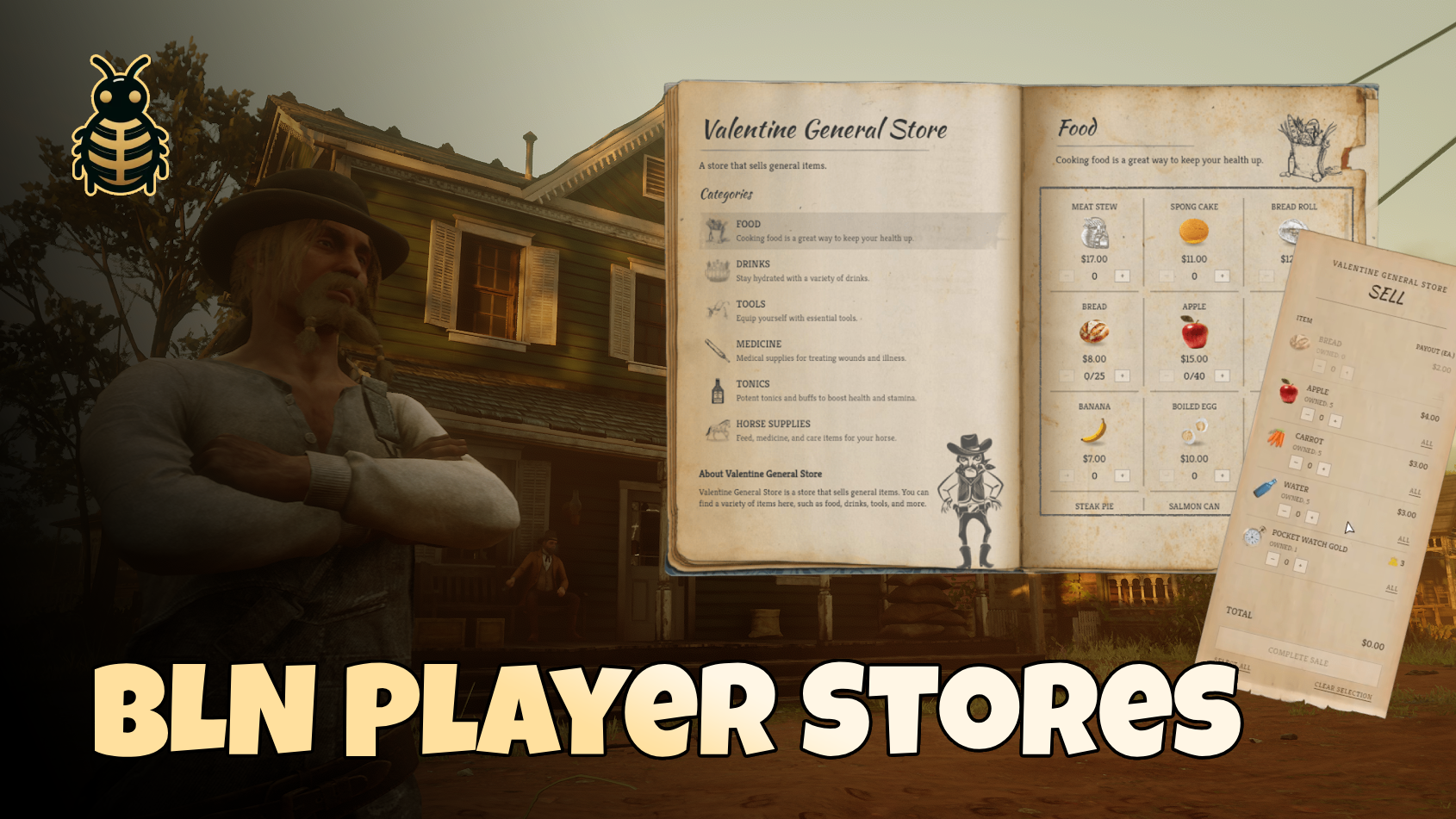
BLN Player Stores turns any spot on the map into a shop owned by a character, backed by a full BLN Society — takings, staff, ranks, and permissions live in the society menu, not in a separate system.
Customers browse a beautiful book-style catalog and sell items on a clean receipt slip. Owners and staff manage categories, stock, prices, buy orders, coupons, and sales from one manage panel. Server admins create and place stores in-game with /playerstores.
Not sure which shop script you need?
- BLN Stores — config-defined NPC shops (general store, trapper, gunsmith). Prices and items live in Lua config files.
- BLN Player Stores (this resource) — database-driven shops run by players. Stock comes from real inventory deposits; every store has its own society account and staff.
✨ What can you do with it?
For players & business owners
- 🏬 Player-owned shops — each store is a real business with its own society, balance, and staff
- 📖 Book UI — customers browse categories, fill a cart, apply coupons, and check out
- 🧾 Sell slip — players sell items the store has buy orders for, paid from the store's account
- 📦 Real stock — deposit goods from your satchel onto shelves; stock 0 shows as sold out
- 🏷️ Categories & pricing — create shelves, set buy/sell prices per item, optional custom labels
- 💵 Buy orders — define what the store pays players for (out of its own money)
- 🎟️ Coupons — discount codes customers type at the till
- 🏷️ Sales — automatic percentage discounts on selected items
- 🔓 Open / closed — toggle whether customers can browse and buy
- 👥 Staff via society — hire, rank, and permission staff through the linked society menu
- 💰 Cash & gold — per-item currency support
- 🗺️ Map blips & markers — each store can have its own world point and blip icon
For server admins
- 🛠️ Admin menu —
/playerstoresto create, move, teleport to, and manage every store - 📍 Place anywhere — stand where the counter should be and create a store on the spot
- 🔐 Access control —
Config.admin.allowIfchecked on every admin action - 💸 Tax routing — percent or flat tax on purchases, sent to treasury, burned, or custom logic
- 🌍 Translations — all player-facing text in one locale file
For developers
- 🔌 Server & client exports — create stores, read catalog/stock, open the book, check permissions
- 📡 Events — react to store lifecycle, purchases, and sales
- 📦 Statebags — client reads store directory and revision without polling
- 🔗 Society integration — one society per store; dissolve is blocked while the store is active
💻 Framework compatibility
✅ VORP ✅ RSG ✅ Custom
📦 Dependencies
Make sure these are started before bln_player_stores:
- oxmysql
- bln_lib - v3.1.6+
- bln_society - v1.0.2+
- bln_notify
⚙️ Installation
- Download and extract
bln_player_storesinto yourresourcesfolder - Add to your
server.cfgafterbln_society:
ensure bln_player_stores- Edit the config files in
bln_player_stores/config/(see below) - Restart the server — tables are created automatically on first boot
🚀 Getting started
1. Create a store (admin)
- Run
/playerstores(or whatever you set inConfig.admin.command) - Stand where the shop counter should be
- Press Create Store, enter a name, and assign the owner's server id
- A society is created from your configured preset and linked to the store
2. Stock the shelves (owner / staff)
- Walk up to the store and press Manage Store (staff only)
- Open Categories — create a shelf and pick an icon
- Deposit items from inventory onto the shelf and set prices
- Toggle the store open from Settings when ready for customers
3. Customers shop
- Browse — open the book, add items to cart, apply a coupon, pay
- Sell — appears only when the store has at least one buy order configured
📋 Manage panel tabs
Staff see tabs based on their society permissions:
| Tab | What it does |
|---|---|
| Overview | Balance, stock summary, members — plus a button into the society menu |
| Categories | Shelves, deposit/withdraw stock, item order, custom labels |
| Buying | Buy orders — what the store pays players, capped by store balance |
| Coupons | Create and manage discount codes |
| Sales | Running percentage discounts |
| Settings | Store name, notice text, open/closed |
Important: depositing stock is a real inventory move — goods leave the player's satchel. Taking stock back requires finances.withdraw because it removes value from the business.
🏛️ Society integration
Every store is backed by exactly one BLN Society:
- Money — sales credit the store's society account; buy orders debit it
- Staff — members, ranks, and permissions are managed in the society menu
- Wages — the store society pays wages from its own takings (no society action fees on store societies)
- Delete protection — while a store is active, its society cannot be dissolved from the society UI
Give someone society.manage and they can run shelves, categories, coupons, and sales. Give them finances.withdraw as well to set prices, manage buy orders, and withdraw stock.
📁 Config files
| File | What it's for |
|---|---|
main.cfg.lua | Admin command, tax, trade limits, world points, security |
permissions.cfg.lua | Maps store actions → society permissions |
locale.cfg.lua | All UI and notification text |
Admin access (main.cfg.lua)
Config.admin = {
    command = 'playerstores',   -- false to disable the chat command
    allowIf = function(source)
        -- Example: return IsPlayerAceAllowed(source, 'bln.stores')
        return true
    end,
},
allowIf is re-checked on every admin request — never trusted from the UI.
Society preset
Config.society = {
    preset = 'business',   -- must exist in bln_society/config/presets.cfg.lua
},
Tax
Tax is added on top of what the customer pays and is never credited to the store.
Config.tax = {
    enabled = true,
    mode = 'percent',      -- 'percent' | 'flat'
    amount = 0.05,         -- 5% when mode is 'percent'
    max = false,           -- cap per transaction, false = no cap
    applyToGold = false,

    -- false             burn the tax (leave the economy)
    -- '<societyId>'     credit a treasury society
    -- function(ctx)     custom routing; return true when handled
    destination = false,
}
Custom destination example:
Config.tax.destination = function(ctx)
    -- ctx = { storeId, storeName, societyId, characterId, source,
    --         amount, currency, kind = 'buy'|'sell', ref }
    exports.my_treasury:Deposit(ctx.amount, ctx.currency, ctx.ref)
    return true
end
Trade limits
Config.trade = {
    maxCartLines = 20,
    maxItemQuantity = 99,
    minPrice = 0.01,
    maxPrice = 100000.0,
    maxStockPerItem = 5000,
    sellReserve = 0.0,              -- minimum balance kept when paying buy orders
    closeAfterTransaction = false,
},
World points & blips
Config.points = {
    prompts = {
        buy = { key = Keys.E },
        sell = { key = Keys.R },
        manage = { key = Keys.G },
    },
    defaults = {
        marker = { type = 'default', distance = 12.0, ... },
        prompt = { enabled = true, distance = 2.0 },
        blip = {
            enabled = true,
            sprite = 'blip_shop_store',
            color = false,
            closedColor = 'BLIP_MODIFIER_TOD_DAYTIME_ONLY',
        },
    },
},
Blip icons are served from bln_society — this resource ships none of its own.
🔐 Permissions (permissions.cfg.lua)
The store does not invent permissions — it maps actions onto keys from bln_society:
| Store action | Default society permission |
|---|---|
| Open manage panel, society menu, duty | Member / duty.use |
| View balance | finances.view |
| Categories, stock deposit, coupons, sales, settings | society.manage |
| Prices, buy orders, stock withdraw | finances.withdraw |
Use Permissions.MEMBER to open an action to anyone on the books, or Permissions.PUBLIC for every customer. The society owner always passes every check.
💰 Pricing order
Applied in this order (same on server and in the UI preview):
- Sale — percentage off shelf price (largest sale wins if two overlap; they do not stack)
- Coupon — discount off the subtotal
- Tax — added last on what remains
Cash and gold are kept separate throughout. The server always re-resolves prices from the database at checkout — the UI maths is preview only.
🔌 Developer API
All calls: exports.bln_player_stores:ExportName(...)
Wait for
bln_player_stores:readybefore write exports. Writes returnnot_readyuntil boot finishes.
Response shape
Writes return:
{ success = true, code = 'store_created', message = '...', args = {}, data = {} }Reads return the value directly, or { success = false, code = 'store_not_found' } when missing.
Optional actor on writes: { charId = '42', name = 'Arthur Morgan' }
Server exports
Meta
| Export | Arguments | Returns |
|---|---|---|
IsReady() | – | boolean |
GetConstants() | – | Const table |
GetSettings() | – | { currencies, tax, trade, limits, points } |
Stores
| Export | Arguments | Returns |
|---|---|---|
CreateStore(data) | see below | response, data = { storeId, societyId } |
GetStore(storeId) | response, data = store | |
GetStoreBySociety(societyId) | response, data = store | |
GetStores() | response, data = store[] | |
CountStores() | integer | |
UpdateStore(storeId, data, actor?) | { name?, description?, paragraphTitle?, paragraphText?, status? } | response |
SetStorePoint(storeId, point, actor?) | see Point | response |
ClearStorePoint(storeId) | response | |
DeleteStore(storeId, opts?) | { dissolveSociety?, actorName?, actorCharId? } | response |
GetStoreSociety(storeId) | societyId|nil |
CreateStore data:
{
    name = 'Valentine Apothecary',
    description = 'Herbs and tonics.',
    ownerCharId = '42',
    ownerName = 'Arthur Morgan',
    preset = 'business',
    point = { ... },
}
Point
Used by CreateStore and SetStorePoint:
{
    coords = { x = -324.0, y = 804.0, z = 117.8, h = 90.0 },
    blip = { sprite = 'blip_shop_store', name = 'Apothecary', color = false },
    marker = { type = 'default', scale = 1.0, distance = 12.0 },
    prompt = { enabled = true, distance = 2.0 },
}
Catalogue & stock
| Export | Arguments | Returns |
|---|---|---|
GetCatalog(storeId) | response, data = { categories = [...] } | |
GetStock(storeId, itemName) | integer | |
AddStock(storeId, itemName, quantity) | response, data = { itemId, accepted } | |
SetOffer(storeId, data, actor?) | see below | response |
SetOffer data:
{
    name = 'deer_pelt',
    label = 'Deer Pelt',
    sellPrice = 6.50,
    sellCurrency = 0,
    maxStock = 100,
    categoryId = 1,
}
Coupons & sales
| Export | Arguments | Returns |
|---|---|---|
CreateCoupon(storeId, data, actor?) | see below | response |
GetCoupons(storeId) | response, data = coupon[] | |
DeleteCoupon(storeId, couponId, actor?) | response | |
CreateSale(storeId, data, actor?) | see below | response |
GetSales(storeId) | response, data = sale[] | |
DeleteSale(storeId, saleId, actor?) | response |
CreateCoupon data:
{
    code = 'WELCOME10',
    kind = 'percent',       -- 'percent' | 'flat'
    value = 10,
    scope = 'all',          -- 'all' | 'category'
    categoryId = 1,
    minTotal = 0,
    maxUses = 50,
    perCharacterLimit = 1,
    expiresInDays = 7,
}
CreateSale data:
{
    percent = 15,
    scope = 'all',          -- 'all' | 'category'
    categoryId = 1,
    durationHours = 48,
}
Permissions
| Export | Arguments | Returns |
|---|---|---|
HasStorePermission(storeId, characterId, action) | action from permissions.cfg.lua | boolean |
GetStorePermissions(storeId, characterId) | table |
Directory & UI
| Export | Arguments | Returns |
|---|---|---|
GetDirectory() | table keyed by store id | |
GetRevision() | integer | |
OpenStore(storeId, source, mode) | mode: 'buy' | 'sell' | 'manage' | response |
Server events
| Event | Arguments |
|---|---|
bln_player_stores:ready | – |
bln_player_stores:storeCreated | storeId, societyId |
bln_player_stores:storeDeleted | storeId, societyId |
bln_player_stores:storeMoved | storeId, point |
bln_player_stores:purchase | storeId, characterId, lines, total |
bln_player_stores:sale | storeId, characterId, lines, total |
Client exports
Statebag reads. Public directory only — no prices, stock, or balance.
| Export | Arguments | Returns |
|---|---|---|
IsReady() | – | boolean |
GetDirectory() | – | table |
GetStore(storeId) | table|nil | |
GetRevision() | – | integer |
IsStaff(storeId) | boolean | |
HasPermission(storeId, action) | boolean | |
OpenStore(storeId, mode) | 'buy' | 'sell' | 'manage' | – |
CloseUi() | – | – |
IsUiOpen() | – | boolean |
Client events
| Event | Arguments |
|---|---|
bln_player_stores:c:ready | – |
bln_player_stores:c:directoryChanged | directory |
❓ FAQ
BLN Stores are static NPC shops — you define items and prices in config files and restart to change them.
BLN Player Stores are player-run businesses — stock comes from real inventory deposits, prices are set in-game, and each shop has a society with staff and a bank account.
While a store is active, its society delete action is locked in the society UI. Delete or close the store from the admin menu first (optionally dissolving the society when you do).
The store has no buy orders. Add at least one item with a buy-back price under the Buying tab.
No. Buy orders are capped by the store's society balance (minus Config.trade.sellReserve). If the till is empty, buy orders pause until money comes in from sales.
No. Weapons deposited onto a shelf come back off as fresh items — there is no framework-neutral way to round-trip serial numbers and wear. This is called out in the resource design.
Yes. Item name must match your inventory database exactly or deposits and transactions will fail silently or reject.
No. Schema is created and migrated automatically on resource start. Applied versions are tracked in bln_player_store_schema.
🤝 Support
Need help? Join our Discord: